
Introducing Inertia Notifications: Toasts, a notification center, and preferences for Laravel and Inertia.js
It's been more than two years since my last post here, so a new package feels like a good reason to dust off the blog! Say hello to Inertia Notifications. It brings toasts, a notification center, and notification preferences to your Laravel and Inertia.js app, with components for both Vue and React.
It joins the rest of the Inertia UI family, like Inertia Modal, Inertia Table, and Inertia Forms. The package has three parts:
- Toasts that you flash from Laravel or show from JavaScript.
- A notification center with a bell, an inbox, and announcements, built on Laravel's notification system.
- Preferences that let your users choose what reaches them, and when.
It's free and open source!
Toasts
Flash Them From Your Controller
Let's start with toasts. You can flash one right from your controller, and redirect as usual:
use InertiaUI\Notifications\Toast; Toast::success('Profile saved') ->description('Your changes are live.') ->flash(); return back();The toast shows up after the next Inertia response, so there are no frontend events to wire up for every message. Under the hood, it uses Inertia's flash data. The toast survives redirects, and it shows only once, even when the user navigates back.
Success, info, warning, error, and loading toasts work out of the box, and you can add your own types.
Undo Buttons and Other Actions
Toasts can have actions, and these actions make real Inertia requests. Say a user archives a message. You can give the toast an Undo button, right from PHP:
Toast::make('Message archived') ->action(ToastAction::make('Undo')->post($restoreUrl)) ->flash();The button shows a spinner while the request runs. If the request fails, the toast stays open, so the user can try again.
Toasts From JavaScript
Of course, you can also show toasts from the frontend. Call toast(), or toast.success(), toast.error(), and friends. They use the same components, so they look exactly like the toasts you flash from Laravel.
For Inertia visits, there's toast.track(). It shows a loading toast with the upload progress, followed by a success toast, or by the toast your server flashed:
toast.success('Link copied') router.post('/photos', { photos }, toast.track({ loading: 'Uploading photos…', success: 'Photos uploaded',}))The Notification Center
A Bell in Your Layout
Next up: the notification center! Put the bell in your layout, and your users get unread counts, categories, snoozing, archiving, and bulk actions:
<template> <header> <Logo /> <NotificationCenter href="/inbox" /> </header> <main> <slot /> </main> <Toaster /></template>Prefer a full page instead of a panel? Inbox::page() gives you one. On phones, the panel turns into a bottom sheet with the tabs under your thumb.
Sending Notifications
You don't have to learn a new way to send notifications. The package builds on Laravel's notification system: add the inbox channel to the via() method, and return an InboxMessage from the toInbox() method. That's it!
class InvoicePaid extends Notification{ public function via(object $notifiable): array { return ['inbox']; } public function toInbox(object $notifiable): InboxMessage { return InboxMessage::make('Invoice paid') ->category('billing') ->toast(); }}Want the notification to pop up as a toast as well? Call toast(), like in the example above. Already using Laravel's database channel? Inbox::import() brings your existing notifications along.
Live Updates, Browser Alerts, and Web Push
Notifications arrive live through Laravel Echo, or you can poll the counts. When your app is open in another tab, the package can show the unread count in the tab title and on the app icon, plus a desktop notification.
What if every tab is closed? Enable web push and add push() to the message. There's no extra Composer or npm package needed:
return InboxMessage::make('Invoice paid') ->body('Acme paid $1,200.') ->category('billing') ->url('/invoices/1042') ->push();Collapsing Notifications
Say ten people like the same post. You don't want ten notifications, right? Give them a group and call collapse(), and the bell counts just one:
return InboxMessage::make(':actors liked your post') ->actor($like->user) ->group("likes:{$like->post_id}") ->collapse(minutes: 60);The :actors placeholder names them in the title, like "Jane and 9 others liked your post". This works in the inbox, in toasts, in push notifications, and in digest emails.
Announcements
Need to tell everyone about scheduled maintenance or a new feature? Publish an announcement:
Announcement::make('Scheduled maintenance on Sunday') ->body('The app is read-only from 02:00 to 03:00 UTC.') ->audience('plan', 'pro', 'team') ->expiresAt(now()->next('Monday')) ->publish();The package stores an announcement only once, so even users who sign up later will see it. You can target an audience, like admins or users on a certain plan, and let the announcement expire on its own.
Preferences
Categories and Channels
Users can choose what reaches them, by category and by channel. They can even turn off a whole channel, like all email. You define the categories in the config file, where you can limit a category to certain channels, make it opt-in, or lock security notifications on:
'categories' => [ 'comments' => ['label' => 'Comments'], 'billing' => ['label' => 'Billing', 'channels' => ['mail']], 'security' => ['label' => 'Security', 'locked' => true], 'product' => ['label' => 'Product updates', 'opt_in' => true],],The preferences component saves the changes, and the package applies the rules whenever Laravel sends a notification. Your notification classes stay the same.
Digests
Nobody wants twenty emails for twenty comments. That's why users can get them in an hourly, daily, or weekly digest instead. The bell still shows each notification right away. Add 'digest' => true to a category:
'categories' => [ 'comments' => ['label' => 'Comments', 'digest' => true], 'billing' => ['label' => 'Billing', 'digest' => true], 'security' => ['label' => 'Security', 'locked' => true],],Then schedule one command, and the digest goes out in each user's timezone, using a ready-made mail:
Schedule::command('inertia-notifications:send-digests') ->everyMinute() ->withoutOverlapping();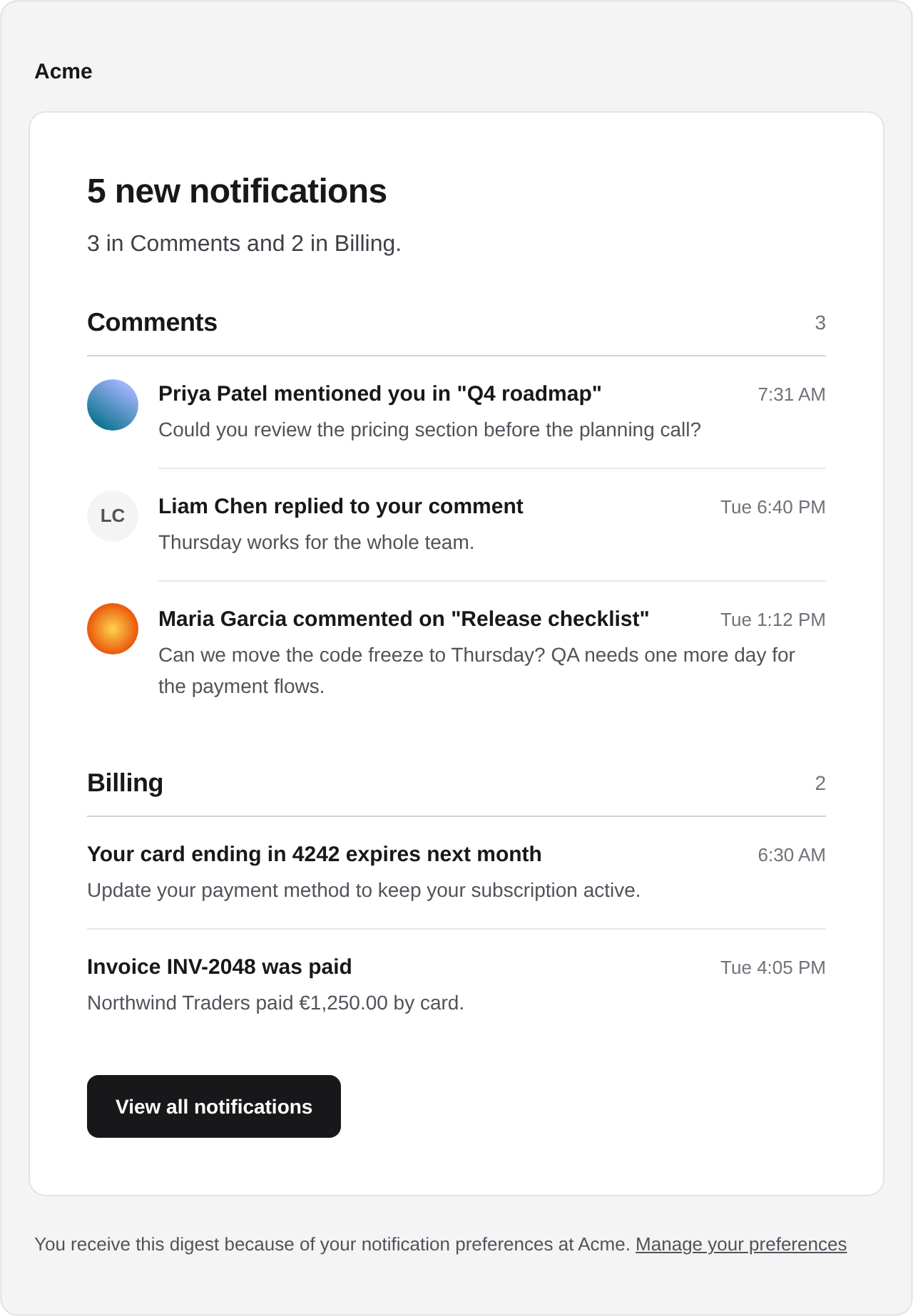
No Email for What They Already Read
Did the user already read the notification in the app? Then there's no need to email it too. For queued notifications, unlessReadWithin() skips the email when the user reads the notification within ten minutes:
return InboxMessage::make('Invoice paid') ->unlessReadWithin(minutes: 10, channels: ['mail']);Notification Hours and Pausing
Users can also set their notification hours, or pause everything for a while. Outside their hours, notifications land quietly in the inbox, while the emails wait until their hours start and then arrive together in one digest. Security alerts and other locked categories still come through right away.
Make It Look Like Your App
You can style the components with CSS tokens for colors, corners, and focus rings. Light and dark themes are included, plus a shadcn theme that uses your app's CSS variables:
:root { --color-iui-inbox-accent: #7c3aed; --color-iui-inbox-accent-subtle: #f5f3ff; --color-iui-inbox-unread: #7c3aed; --color-iui-toast-success: #16a34a; --radius-iui-inbox: 1rem; --radius-iui-toast: 1rem;}Want full control? Go headless with the Vue composables or React hooks, and bring your own markup. The package doesn't depend on Headless UI, Radix, or Floating UI.
Testing
Just like Laravel's own fakes, you can fake the toasts in your test suite and make assertions:
it('confirms the invoice was sent', function () { Toast::fake(); $this->post('/invoices', ['amount' => 1500])->assertRedirect(); Toast::assertFlashed('Invoice sent'); Toast::assertNotFlashed('Payment failed');});There are testing helpers for the notification center as well.
There's Even More in the Box
I can't cover everything in one post, but here are some other features you'll find in the documentation:
- Teams and tenants
- Toasts from JSON endpoints and
fetch()calls - Updating and retracting notifications
- Sending a notification only once
- Server-side rendering
- Translations and screen reader support
Installation
The package requires PHP 8.3+, Laravel 12 or 13, Inertia 3.11+, and Tailwind CSS 4.3+. You can install it with Composer and then run the install command:
composer require inertiaui/notifications php artisan inertia-notifications:installThe install command publishes the config file and the migrations, and lists the remaining steps for your Vue or React frontend. Building on one of the Laravel starter kits? The command detects the kit and tells you exactly which files to change. It also offers to add the package's guidelines and skill to Laravel Boost, so your AI agent knows how to use it.
Free and Open Source
Inertia Notifications is free forever and open source under the MIT license. You'll find the full documentation on the Inertia UI website, and the source code is available on GitHub.
Times have changed since I started building the Inertia UI packages in 2024, so I'm rethinking the pricing of the other packages too. More on that soon!
I'd love to hear what you build with it, so let me know on X or Bluesky. Happy notifying!